en


The DK88 app puts the lobby in your pocket: slots, live tables, instant games and the sportsbook, all through the account you already use. DashKing88, our full name, delivers it two ways, because the two phone platforms work differently. Android players install a real app from an APK file served by our own download button, so the download takes a single tap. iPhone players add the casino app straight from Safari as a home-screen app, since there is no App Store listing.
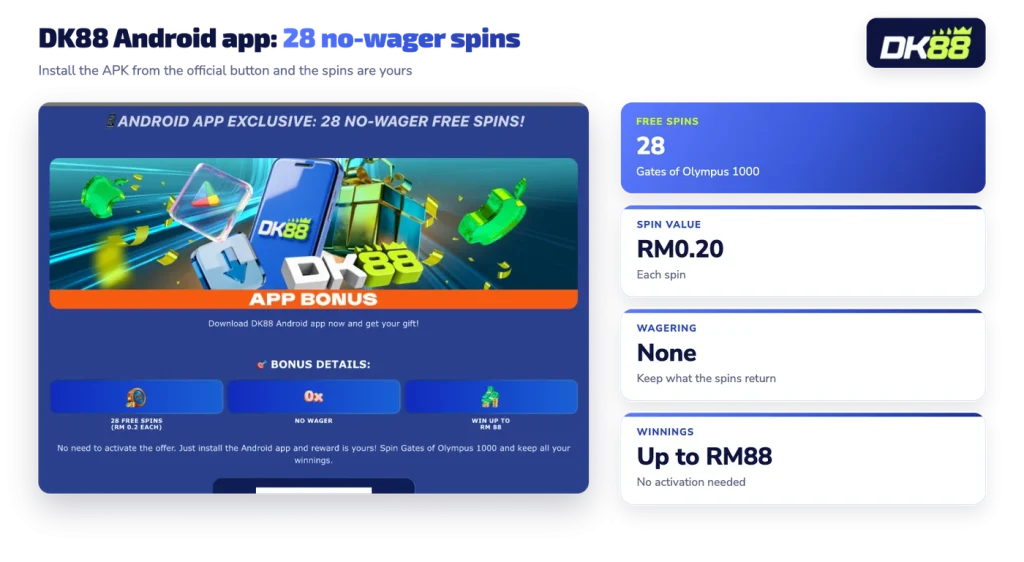
The Android route also pays for itself. Installing the app credits 28 wager-free free spins on Gates of Olympus 1000, with no code and no activation step.
Two routes lead to the same Android app. Our app page shows a QR code and a Download for Android button: scan the code with your phone camera if you are reading on a desktop, or tap the button when you are already on the device you want to install on. The Android icon under Mobile App in the footer of every page points to the same download. A DashKing88 download and a DK88 download are the same file, not two competing apps.
Because Android allows installs from outside a store, the file comes direct rather than through a listing. That is normal for any app installed outside a store, and it is why the source of the file matters so much.
Stated
Android App Exclusive, 28 no-wager free spins on Gates of Olympus 1000.
In practice
Each spin is set at RM0.20, winnings from the spins can reach RM88, and there is nothing to activate. Install the Android app and the reward is yours, with the winnings yours to keep rather than locked behind a turnover requirement.
The install itself takes a handful of taps.
Android and iPhone both start from the same official download, and the install reward needs nothing more than the app.
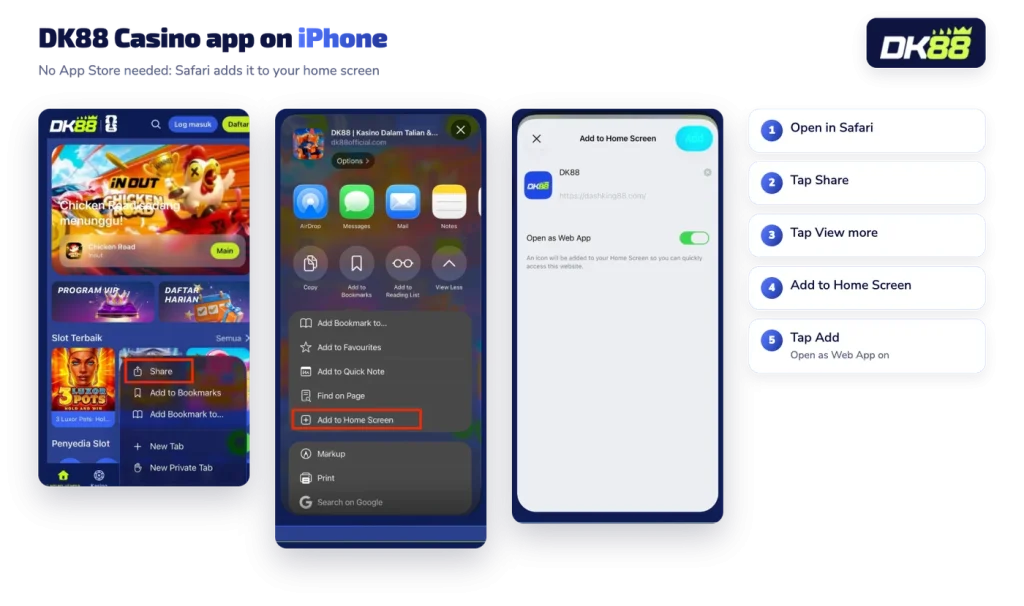
There is no App Store listing for DK88. Instead, Safari turns the platform into a home-screen app. As a rule, a home-screen web app opens in its own window without the browser address bar, carries its own icon and behaves like any other app you tap, which is why the steps below end with an icon rather than a store install.
The iPhone install is not tied to the Android reward, so an iOS player who wants the 28 spins would need the Android app on an Android device. Everything else, from the cashier to the VIP Program, works the same way from the home-screen icon.
There is one account per person, and the app is simply another door into it. The username and password are the same, the MYR balance is the same, and any active bonus continues where you left it. Your VIP Program level, your Dash Coins and the King’s Market catalogue all follow the account rather than the device, so progress made on a desktop is visible on the phone.
What the app is for, in practice, is the whole lineup on a small screen: reels, live dealer tables, crash and fishing titles, and pre-match or live sports with the odds format you prefer. Our full casino and sports lineup is organised the same way in both places, and the categories you use most sit behind the lobby shortcuts.
If the login screen is giving you trouble, the cause is the password rather than the app in most cases, and our login and password help covers how to get back in through support.
Players who mainly want the reels can browse the slot lobby first and install afterwards.
Treat the installer like a bank card. Use the Download for Android button, its QR code or the footer icon, and nothing else. An APK hosted on a page you do not recognise can imitate a login screen convincingly, and anything typed into that screen is handed to whoever built it. The same goes for files forwarded in chat groups, even by someone helpful: a DashKing88 APK that arrives as an attachment has no traceable origin.
Two habits protect the account. Keep your credentials to yourself, because activity carried out with your login counts as yours. Then, when Android raises its warning about installing from an unknown source, read it as the routine prompt it is for any store-free install, not as a reason to hunt for a different file elsewhere.
| Detail | DK88 |
|---|---|
| Android install | APK from the official download button or QR code |
| iPhone install | Safari home-screen app, added through Share |
| App reward | 28 free spins at RM0.20, wager-free, winnings up to RM88 |
| Account | Same login, balance and bonuses as the site |
| Store listing | None |
Read the table as a short checklist before you install: the Android file should come from our button, the iPhone icon from Safari, and the login details from your existing account.